


OnePlus N100 Combo and Folder with Frame (100% Original)
Availability: In Stock
₹1,587
Seller Specifications
- Product Type: LCD with Touch Screen Combo and Frame
- Compatibility: OnePlus N100
- Condition: 100% Original, Brand New
- Components Included:
- LCD Screen
- Digitizer Touch Screen
- Frame
- Quality: High manufacturing quality, ensuring a perfect fit and seamless integration with the device.
- Testing: Each unit is pre-tested before shipping to ensure it meets quality standards.
- Ease of Installation: Designed for easy installation with minimal technical knowledge required.
Application
This combo and folder with frame is ideal for:
- Screen Replacement: Perfect for replacing a broken, cracked, or scratched screen on your OnePlus N100.
- Restoring Functionality: Ensures your device functions like new with a responsive touch screen and clear display.
- DIY Repairs: Suitable for those who prefer to repair their devices themselves, with minimal technical knowledge required.
- Professional Repairs: Also ideal for repair shops and technicians looking for high-quality replacement parts.
- New

OnePlus 7 Pro Combo and Folder with Frame (100% Original)
Availability: In Stock
₹10.74K
Seller Specifications
- Product Type: LCD with Touch Screen Combo and Frame
- Compatibility: OnePlus 7 Pro
- Condition: 100% Original, Brand New
- Components Included:
- LCD Screen
- Digitizer Touch Screen
- Frame
- Quality: High manufacturing quality, ensuring a perfect fit and seamless integration with the device.
- Testing: Each unit is pre-tested before shipping to ensure it meets quality standards.
- Ease of Installation: Designed for easy installation with minimal technical knowledge required.
Application
This combo and folder with frame is ideal for:
- Screen Replacement: Perfect for replacing a broken, cracked, or scratched screen on your OnePlus 7 Pro.
- Restoring Functionality: Ensures your device functions like new with a responsive touch screen and clear display.
- DIY Repairs: Suitable for those who prefer to repair their devices themselves, with minimal technical knowledge required.
- Professional Repairs: Also ideal for repair shops and technicians looking for high-quality replacement parts.
- New

Tecno/Infinity BB4K Combo and Folder with Frame (100% Original)
Availability: In Stock
₹1,343
Seller Specifications
- Product Type: LCD with Touch Screen Combo and Frame
- Compatibility: Tecno/Infinity BB4K
- Condition: 100% Original, Brand New
- Components Included:
- LCD Screen
- Digitizer Touch Screen
- Frame
- Quality: High manufacturing quality, ensuring a perfect fit and seamless integration with the device.
- Testing: Each unit is pre-tested before shipping to ensure it meets quality standards.
- Ease of Installation: Designed for easy installation with minimal technical knowledge required.
Application
This combo and folder with frame is ideal for:
- Screen Replacement: Perfect for replacing a broken, cracked, or scratched screen on your Tecno/Infinity BB4K.
- Restoring Functionality: Ensures your device functions like new with a responsive touch screen and clear display.
- DIY Repairs: Suitable for those who prefer to repair their devices themselves, with minimal technical knowledge required.
- Professional Repairs: Also ideal for repair shops and technicians looking for high-quality replacement parts.
- New

Tecno/Infinity A44 Combo and Folder with Frame
Availability: In Stock
₹1,038
Product Specification
Product Type:
LCD with Touch Screen Combo
Compatibility:
Tecno/Infinity A44
Quality:
100% Original, High Manufacturing Quality
Fit:
Perfect fit for the specified model
Ease of Replacement:
Requires minimal technical knowledge for installation
Application
Installation Instructions:
- Power Off: Ensure the device is powered off before starting the replacement.
- Remove Old Screen: Carefully remove the old screen using appropriate tools.
- Clean Surface: Clean the surface to remove any dust or adhesive residue.
- Align New Screen: Align the new LCD and touch screen combo with the frame.
- Secure the Screen: Secure the screen in place using the provided adhesive or screws.
- Test the Screen: Power on the device to test the new screen for functionality.
- Final Assembly: Complete the assembly and ensure all parts are securely in place.
Usage Tips:
- Handle the screen with care to avoid damage.
- Follow the installation instructions carefully to ensure proper fit and functionality.
- If unsure about the installation process, seek professional help.
- New

Tecno/Infinity A46 Combo and Folder with Frame (100% Original)
Availability: In Stock
₹1,038
Seller Specification of Tecno/Infinity A46 Combo and Folder with Frame (100% Original)
Compatibility:
- Specifically designed for the Tecno/Infinity A46 model.
Components:
- Complete LCD with touch screen.
- Digitizer touch screen.
- Frame included for easy installation.
Quality:
- 100% original and high manufacturing quality.
- Perfect fit for the device.
- Thoroughly tested before shipping to ensure functionality.
Ease of Installation:
- Designed for easy replacement with minimal technical knowledge required.
Application
- Repair and Replacement: Ideal for replacing a damaged or non-functional screen on the Tecno/Infinity A46.
- Restoration: Helps restore the device to its original condition, ensuring optimal performance and appearance.
- Maintenance: Useful for regular maintenance to keep the device in top working condition.
- New

Nokia 2 Combo and Folder with Frame (100% Original)
Availability: In Stock
₹855
Seller Specifications
- Display Type: LTPS IPS LCD with Touchscreen Glass.
- Display Size: 5.0 inches.
- Resolution: 720 x 1280 pixels.
- Touchscreen Glass: Corning Gorilla Glass 3 protection.
- Compatibility: Specifically designed for Nokia 2 (Model Number TA-1011).
- Manufacturer: OEM (Original Equipment Manufacturer).
- Condition: Brand new.
Applications
- Screen Replacement: Ideal for replacing a broken, cracked, or scratched screen on the Nokia 2.
- Touchscreen Repair: Perfect for fixing issues with the touchscreen responsiveness.
- Display Upgrade: Can be used to upgrade the display quality if the original screen has degraded over time.
- Maintenance: Useful for regular maintenance and ensuring the phone remains in optimal working condition.
- Resale Value: Enhances the resale value of the phone by restoring it to its original condition.
Installation Process
- Preparation:
- Power off the phone.
- Gather necessary tools (e.g., screwdriver, plastic prying tools, tweezers).
- Remove Back Cover:
- Carefully remove the back cover of the phone.
- Disconnect Battery:
- Disconnect the battery to avoid any electrical issues.
- Remove Old Display:
- Unscrew and carefully remove the old display and touchscreen.
- Install New Combo:
- Place the new display combo in the frame.
- Connect the display and touchscreen connectors.
- Reassemble Phone:
- Reconnect the battery.
- Screw back the components and replace the back cover.
- Test the Display:
- Power on the phone and test the new display to ensure it is working correctly.
Features
- High-Resolution Display: Provides clear and vibrant visuals with a resolution of 720 x 1280 pixels.
- Responsive Touchscreen: Ensures smooth and accurate touch response.
- Gorilla Glass Protection: Offers durability and resistance to scratches and minor impacts.
- OEM Quality: Matches the original display quality, ensuring seamless performance.
- New

Nokia 3 Combo and Folder with Frame (100% Original)
Availability: In Stock
₹916
Seller Specifications
- Display Type: IPS LCD with Touchscreen Glass.
- Display Size: 5.0 inches.
- Resolution: 720 x 1280 pixels.
- Touchscreen Glass: Corning Gorilla Glass 3 protection.
- Compatibility: Specifically designed for Nokia 3 (Model Number TA-1032).
- Manufacturer: OEM (Original Equipment Manufacturer).
- Condition: Brand new.
Applications
- Screen Replacement: Ideal for replacing a broken, cracked, or scratched screen on the Nokia 3.
- Touchscreen Repair: Perfect for fixing issues with the touchscreen responsiveness.
- Display Upgrade: Can be used to upgrade the display quality if the original screen has degraded over time.
- Maintenance: Useful for regular maintenance and ensuring the phone remains in optimal working condition.
- Resale Value: Enhances the resale value of the phone by restoring it to its original condition.
Installation Process
- Preparation:
- Power off the phone.
- Gather necessary tools (e.g., screwdriver, plastic prying tools, tweezers).
- Remove Back Cover:
- Carefully remove the back cover of the phone.
- Disconnect Battery:
- Disconnect the battery to avoid any electrical issues.
- Remove Old Display:
- Unscrew and carefully remove the old display and touchscreen.
- Install New Combo:
- Place the new display combo in the frame.
- Connect the display and touchscreen connectors.
- Reassemble Phone:
- Reconnect the battery.
- Screw back the components and replace the back cover.
- Test the Display:
- Power on the phone and test the new display to ensure it is working correctly.
Features
- High-Resolution Display: Provides clear and vibrant visuals with a resolution of 720 x 1280 pixels.
- Responsive Touchscreen: Ensures smooth and accurate touch response.
- Gorilla Glass Protection: Offers durability and resistance to scratches and minor impacts.
- OEM Quality: Matches the original display quality, ensuring seamless performance.
- New

Nokia C3 Combo and Folder with Frame (100% Original)
Availability: In Stock
₹1,282
Seller Specifications
- Display Type: IPS LCD with Touchscreen Glass.
- Display Size: 5.99 inches.
- Resolution: 720 x 1440 pixels.
- Touchscreen Glass: Corning Gorilla Glass 3 protection.
- Compatibility: Specifically designed for Nokia C3 (Model Number TA-1275).
- Manufacturer: OEM (Original Equipment Manufacturer).
- Condition: Brand new.
Applications
- Screen Replacement: Ideal for replacing a broken, cracked, or scratched screen on the Nokia C3.
- Touchscreen Repair: Perfect for fixing issues with the touchscreen responsiveness.
- Display Upgrade: Can be used to upgrade the display quality if the original screen has degraded over time.
- Maintenance: Useful for regular maintenance and ensuring the phone remains in optimal working condition.
- Resale Value: Enhances the resale value of the phone by restoring it to its original condition.
Installation Process
- Preparation:
- Power off the phone.
- Gather necessary tools (e.g., screwdriver, plastic prying tools, tweezers).
- Remove Back Cover:
- Carefully remove the back cover of the phone.
- Disconnect Battery:
- Disconnect the battery to avoid any electrical issues.
- Remove Old Display:
- Unscrew and carefully remove the old display and touchscreen.
- Install New Combo:
- Place the new display combo in the frame.
- Connect the display and touchscreen connectors.
- Reassemble Phone:
- Reconnect the battery.
- Screw back the components and replace the back cover.
- Test the Display:
- Power on the phone and test the new display to ensure it is working correctly.
Features
- High-Resolution Display: Provides clear and vibrant visuals with a resolution of 720 x 1440 pixels.
- Responsive Touchscreen: Ensures smooth and accurate touch response.
- Gorilla Glass Protection: Offers durability and resistance to scratches and minor impacts.
- OEM Quality: Matches the original display quality, ensuring seamless performance.
- New
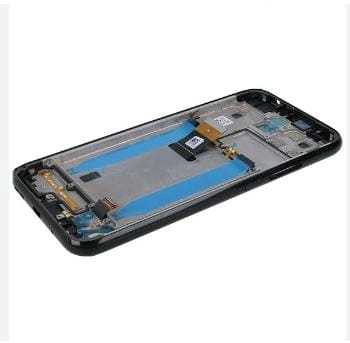
Nokia 4.2 Combo and Folder with Frame (100% Original)
Availability: In Stock
₹1,465
Seller Specifications
- Display Type: IPS LCD with Touchscreen Glass.
- Display Size: 5.71 inches.
- Resolution: 720 x 1520 pixels.
- Touchscreen Glass: Corning Gorilla Glass 3 protection.
- Compatibility: Specifically designed for Nokia 4.1 (Model Numbers TA-1184, TA-1133, TA-1149, TA-1150, TA-1157, TA-1152).
- Manufacturer: OEM (Original Equipment Manufacturer).
- Condition: Brand new.
Applications
- Screen Replacement: Ideal for replacing a broken, cracked, or scratched screen on the Nokia 4.1.
- Touchscreen Repair: Perfect for fixing issues with the touchscreen responsiveness.
- Display Upgrade: Can be used to upgrade the display quality if the original screen has degraded over time.
- Maintenance: Useful for regular maintenance and ensuring the phone remains in optimal working condition.
- Resale Value: Enhances the resale value of the phone by restoring it to its original condition.
Installation Process
- Preparation:
- Power off the phone.
- Gather necessary tools (e.g., screwdriver, plastic prying tools, tweezers).
- Remove Back Cover:
- Carefully remove the back cover of the phone.
- Disconnect Battery:
- Disconnect the battery to avoid any electrical issues.
- Remove Old Display:
- Unscrew and carefully remove the old display and touchscreen.
- Install New Combo:
- Place the new display combo in the frame.
- Connect the display and touchscreen connectors.
- Reassemble Phone:
- Reconnect the battery.
- Screw back the components and replace the back cover.
- Test the Display:
- Power on the phone and test the new display to ensure it is working correctly.
Features
- High-Resolution Display: Provides clear and vibrant visuals with a resolution of 720 x 1520 pixels.
- Responsive Touchscreen: Ensures smooth and accurate touch response.
- Gorilla Glass Protection: Offers durability and resistance to scratches and minor impacts.
- OEM Quality: Matches the original display quality, ensuring seamless performance.
- New
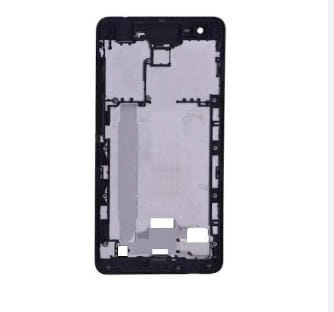
Nokia 2.1 Combo and Folder with Frame (100% Original)
Availability: In Stock
₹1,221
Seller Specifications
- Display Type: IPS LCD with Touchscreen Glass.
- Display Size: 5.5 inches.
- Resolution: 720 x 1280 pixels.
- Touchscreen Glass: Corning Gorilla Glass 3 protection.
- Compatibility: Specifically designed for Nokia 2.1 (Model Numbers TA-1080, TA-1092, TA-1084, TA-1093, TA-1086).
- Manufacturer: OEM (Original Equipment Manufacturer).
- Condition: Brand new.
Applications
- Screen Replacement: Ideal for replacing a broken, cracked, or scratched screen on the Nokia 2.1.
- Touchscreen Repair: Perfect for fixing issues with the touchscreen responsiveness.
- Display Upgrade: Can be used to upgrade the display quality if the original screen has degraded over time.
Installation Process
- Preparation:
- Power off the phone.
- Gather necessary tools (e.g., screwdriver, plastic prying tools, tweezers).
- Remove Back Cover:
- Carefully remove the back cover of the phone.
- Disconnect Battery:
- Disconnect the battery to avoid any electrical issues.
- Remove Old Display:
- Unscrew and carefully remove the old display and touchscreen.
- Install New Combo:
- Place the new display combo in the frame.
- Connect the display and touchscreen connectors.
- Reassemble Phone:
- Reconnect the battery.
- Screw back the components and replace the back cover.
- Test the Display:
- Power on the phone and test the new display to ensure it is working correctly.
Features
- High-Resolution Display: Provides clear and vibrant visuals with a resolution of 720 x 1280 pixels.
- Responsive Touchscreen: Ensures smooth and accurate touch response.
- Gorilla Glass Protection: Offers durability and resistance to scratches and minor impacts.
- OEM Quality: Matches the original display quality, ensuring seamless performance.
- New
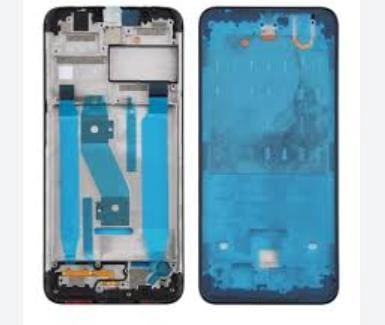
Nokia 3.2 Combo and Folder with Frame (100% Original)
Availability: In Stock
₹1,160
Seller Specifications
- Display Type: IPS LCD with Touchscreen Glass.
- Display Size: 6.26 inches.
- Resolution: 720 x 1520 pixels.
- Touchscreen Glass: Corning Gorilla Glass 3 protection.
- Compatibility: Specifically designed for Nokia 3.2 (Model Numbers TA-1156, TA-1159, TA-1164).
- Manufacturer: OEM (Original Equipment Manufacturer).
- Condition: Brand new.
Applications
- Screen Replacement: Ideal for replacing a broken, cracked, or scratched screen on the Nokia 3.2.
- Touchscreen Repair: Perfect for fixing issues with the touchscreen responsiveness.
- Display Upgrade: Can be used to upgrade the display quality if the original screen has degraded over time.
- Maintenance: Useful for regular maintenance and ensuring the phone remains in optimal working condition.
- Resale Value: Enhances the resale value of the phone by restoring it to its original condition.
Installation Process
- Preparation:
- Power off the phone.
- Gather necessary tools (e.g., screwdriver, plastic prying tools, tweezers).
- Remove Back Cover:
- Carefully remove the back cover of the phone.
- Disconnect Battery:
- Disconnect the battery to avoid any electrical issues.
- Remove Old Display:
- Unscrew and carefully remove the old display and touchscreen.
- Install New Combo:
- Place the new display combo in the frame.
- Connect the display and touchscreen connectors.
- Reassemble Phone:
- Reconnect the battery.
- Screw back the components and replace the back cover.
- Test the Display:
- Power on the phone and test the new display to ensure it is working correctly.
Features
- High-Resolution Display: Provides clear and vibrant visuals with a resolution of 720 x 1520 pixels.
- Responsive Touchscreen: Ensures smooth and accurate touch response.
- Gorilla Glass Protection: Offers durability and resistance to scratches and minor impacts.
- OEM Quality: Matches the original display quality, ensuring seamless performance.
- New

Nokia 6.1 Plus Combo and Folder with Frame (100% Original)
Availability: In Stock
₹1,282
Seller Specifications
- Display Type: IPS LCD with Touchscreen Glass.
- Display Size: 5.8 inches.
- Resolution: 1080 x 2280 pixels.
- Touchscreen Glass: Corning Gorilla Glass 3 protection.
- Compatibility: Specifically designed for Nokia 6.1 Plus (Model Numbers TA-1099, TA-1103, TA-1083).
- Manufacturer: OEM (Original Equipment Manufacturer).
- Condition: Brand new.
Applications
- Screen Replacement: Ideal for replacing a broken, cracked, or scratched screen on the Nokia 6.1 Plus.
- Touchscreen Repair: Perfect for fixing issues with the touchscreen responsiveness.
- Display Upgrade: Can be used to upgrade the display quality if the original screen has degraded over time.
- Maintenance: Useful for regular maintenance and ensuring the phone remains in optimal working condition.
- Resale Value: Enhances the resale value of the phone by restoring it to its original condition.
Installation Process
- Preparation:
- Power off the phone.
- Gather necessary tools (e.g., screwdriver, plastic prying tools, tweezers).
- Remove Back Cover:
- Carefully remove the back cover of the phone.
- Disconnect Battery:
- Disconnect the battery to avoid any electrical issues.
- Remove Old Display:
- Unscrew and carefully remove the old display and touchscreen.
- Install New Combo:
- Place the new display combo in the frame.
- Connect the display and touchscreen connectors.
- Reassemble Phone:
- Reconnect the battery.
- Screw back the components and replace the back cover.
- Test the Display:
- Power on the phone and test the new display to ensure it is working correctly.
Features
- High-Resolution Display: Provides clear and vibrant visuals with a resolution of 1080 x 2280 pixels.
- Responsive Touchscreen: Ensures smooth and accurate touch response.
- Gorilla Glass Protection: Offers durability and resistance to scratches and minor impacts.
- OEM Quality: Matches the original display quality, ensuring seamless performance.
- New

Nokia 5.1 Plus Combo and Folder with Frame (100% Original)
Availability: In Stock
₹1,526
Seller Specifications
- Display Type: IPS LCD with Touchscreen Glass.
- Display Size: 5.86 inches.
- Resolution: 720 x 1520 pixels.
- Touchscreen Glass: Corning Gorilla Glass 3 protection.
- Compatibility: Specifically designed for Nokia 5.1 Plus (Model Numbers TA-1105, TA-1108, TA-1120, TA-1121, TA-1124).
- Manufacturer: OEM (Original Equipment Manufacturer).
- Condition: Brand new.
Applications
- Screen Replacement: Ideal for replacing a broken, cracked, or scratched screen on the Nokia 5.1 Plus.
- Touchscreen Repair: Perfect for fixing issues with the touchscreen responsiveness.
- Display Upgrade: Can be used to upgrade the display quality if the original screen has degraded over time.
- Maintenance: Useful for regular maintenance and ensuring the phone remains in optimal working condition.
- Resale Value: Enhances the resale value of the phone by restoring it to its original condition.
Installation Process
- Preparation:
- Power off the phone.
- Gather necessary tools (e.g., screwdriver, plastic prying tools, tweezers).
- Remove Back Cover:
- Carefully remove the back cover of the phone.
- Disconnect Battery:
- Disconnect the battery to avoid any electrical issues.
- Remove Old Display:
- Unscrew and carefully remove the old display and touchscreen.
- Install New Combo:
- Place the new display combo in the frame.
- Connect the display and touchscreen connectors.
- Reassemble Phone:
- Reconnect the battery.
- Screw back the components and replace the back cover.
- Test the Display:
- Power on the phone and test the new display to ensure it is working correctly.
Features
- High-Resolution Display: Provides clear and vibrant visuals with a resolution of 720 x 1520 pixels.
- Responsive Touchscreen: Ensures smooth and accurate touch response.
- Gorilla Glass Protection: Offers durability and resistance to scratches and minor impacts.
- OEM Quality: Matches the original display quality, ensuring seamless performance.
- New

Nokia 5 Combo and Folder with Frame (100% Original)
Availability: In Stock
₹1,343
Seller Specifications
- Display Type: IPS LCD with Touchscreen Glass.
- Display Size: 5.2 inches.
- Resolution: 720 x 1280 pixels.
- Touchscreen Glass: Corning Gorilla Glass 3 protection.
- Compatibility: Specifically designed for Nokia 5 (Model Numbers TA-1024, TA-1027, TA-1044, TA-1053).
- Manufacturer: OEM (Original Equipment Manufacturer).
- Condition: Brand new.
Applications
- Screen Replacement: Ideal for replacing a broken, cracked, or scratched screen on the Nokia 5.
- Touchscreen Repair: Perfect for fixing issues with the touchscreen responsiveness.
- Display Upgrade: Can be used to upgrade the display quality if the original screen has degraded over time.
- Maintenance: Useful for regular maintenance and ensuring the phone remains in optimal working condition.
- Resale Value: Enhances the resale value of the phone by restoring it to its original condition.
Installation Process
- Preparation:
- Power off the phone.
- Gather necessary tools (e.g., screwdriver, plastic prying tools, tweezers).
- Remove Back Cover:
- Carefully remove the back cover of the phone.
- Disconnect Battery:
- Disconnect the battery to avoid any electrical issues.
- Remove Old Display:
- Unscrew and carefully remove the old display and touchscreen.
- Install New Combo:
- Place the new display combo in the frame.
- Connect the display and touchscreen connectors.
- Reassemble Phone:
- Reconnect the battery.
- Screw back the components and replace the back cover.
- Test the Display:
- Power on the phone and test the new display to ensure it is working correctly.
Features
- High-Resolution Display: Provides clear and vibrant visuals with a resolution of 720 x 1280 pixels.
- Responsive Touchscreen: Ensures smooth and accurate touch response.
- Gorilla Glass Protection: Offers durability and resistance to scratches and minor impacts.
- OEM Quality: Matches the original display quality, ensuring seamless performance.
- New

Nokia G10 Combo and Folder with Frame (100% Original)
Availability: In Stock
₹2,014
Seller Specifications
- Display Type: IPS LCD with Touchscreen Glass.
- Display Size: 6.52 inches.
- Resolution: 720 x 1600 pixels.
- Touchscreen Glass: Corning Gorilla Glass 3 protection.
- Compatibility: Specifically designed for Nokia G10 (Model Numbers TA-1334, TA-1346, TA-1351, TA-1362).
- Manufacturer: OEM (Original Equipment Manufacturer).
- Condition: Brand new.
Applications
- Screen Replacement: Ideal for replacing a broken, cracked, or scratched screen on the Nokia G10.
- Touchscreen Repair: Perfect for fixing issues with the touchscreen responsiveness.
- Display Upgrade: Can be used to upgrade the display quality if the original screen has degraded over time.
- Maintenance: Useful for regular maintenance and ensuring the phone remains in optimal working condition
Installation Process
- Preparation:
- Power off the phone.
- Gather necessary tools (e.g., screwdriver, plastic prying tools, tweezers).
- Remove Back Cover:
- Carefully remove the back cover of the phone.
- Disconnect Battery:
- Disconnect the battery to avoid any electrical issues.
- Remove Old Display:
- Unscrew and carefully remove the old display and touchscreen.
- Install New Combo:
- Place the new display combo in the frame.
- Connect the display and touchscreen connectors.
- Reassemble Phone:
- Reconnect the battery.
- Screw back the components and replace the back cover.
- Test the Display:
- Power on the phone and test the new display to ensure it is working correctly.
Features
- High-Resolution Display: Provides clear and vibrant visuals with a resolution of 720 x 1600 pixels.
- Responsive Touchscreen: Ensures smooth and accurate touch response.
- Gorilla Glass Protection: Offers durability and resistance to scratches and minor impacts.
- OEM Quality: Matches the original display quality, ensuring seamless performance.
- New

Nokia G20 Combo and Folder with Frame (100% Original)
Availability: In Stock
₹2,136
Seller Specifications
- Display Type: IPS LCD with Touchscreen Glass.
- Display Size: 6.52 inches.
- Resolution: 720 x 1600 pixels.
- Touchscreen Glass: Corning Gorilla Glass 3 protection.
- Compatibility: Specifically designed for Nokia G20 (Model Numbers TA-1336, TA-1343, TA-1347, TA-1352).
- Manufacturer: OEM (Original Equipment Manufacturer).
- Condition: Brand new.
Applications
- Screen Replacement: Ideal for replacing a broken, cracked, or scratched screen on the Nokia G20.
- Touchscreen Repair: Perfect for fixing issues with the touchscreen responsiveness.
- Display Upgrade: Can be used to upgrade the display quality if the original screen has degraded over time.
- Maintenance: Useful for regular maintenance and ensuring the phone remains in optimal working condition.
Installation Process
- Preparation:
- Power off the phone.
- Gather necessary tools (e.g., screwdriver, plastic prying tools, tweezers).
- Remove Back Cover:
- Carefully remove the back cover of the phone.
- Disconnect Battery:
- Disconnect the battery to avoid any electrical issues.
- Remove Old Display:
- Unscrew and carefully remove the old display and touchscreen.
- Install New Combo:
- Place the new display combo in the frame.
- Connect the display and touchscreen connectors.
- Reassemble Phone:
- Reconnect the battery.
- Screw back the components and replace the back cover.
- Test the Display:
- Power on the phone and test the new display to ensure it is working correctly.
Features
- High-Resolution Display: Provides clear and vibrant visuals with a resolution of 720 x 1600 pixels.
- Responsive Touchscreen: Ensures smooth and accurate touch response.
- Gorilla Glass Protection: Offers durability and resistance to scratches and minor impacts.
- OEM Quality: Matches the original display quality, ensuring seamless performance.
- New
Mobile Combo & Folder: Convenience and Protection
Get the best of both worlds with our Mobile Combo & Folder. Includes a mobile phone and a protective folder for added convenience and device security. Shop now!

